

Running a business involves countless daily tasks. Employees answer customer questions, schedule appointments, send follow-up messages, update records, process invoices, and manage internal workflows. While these activities are necessary, many of them are repetitive and consume valuable time.
Automation offers a way to simplify these processes without requiring complex technology or a large IT team. Modern automation tools allow businesses of all sizes to reduce manual work, improve accuracy, and create smoother operations.
The key is not automating everything. It is identifying repetitive tasks that slow teams down and using simple solutions to make everyday work more efficient.
What Is Business Automation?
Business automation uses technology to complete repetitive tasks with minimal human involvement. Instead of employees performing the same actions manually every day, automated systems can handle routine processes based on predefined rules.
Examples of business automation include:
- Sending appointment reminders automatically
- Creating invoices after a sale
- Organizing customer information
- Scheduling social media posts
- Sending follow-up emails
- Updating reports automatically
Automation allows employees to spend less time on administrative tasks and more time on activities that require creativity, problem-solving, and customer interaction.
Why Small Businesses Should Consider Automation
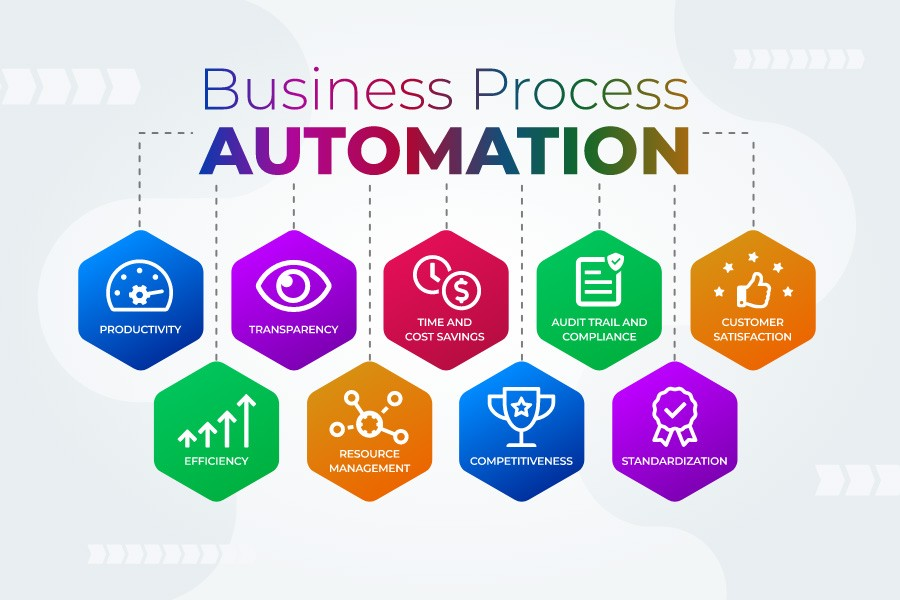
Many small businesses assume automation is only for large companies with expensive software and technical teams. However, modern tools have made automation more accessible than ever.
Small businesses can benefit from automation by:
- Saving employee time
- Reducing repetitive tasks
- Improving customer communication
- Preventing manual errors
- Creating more consistent processes
- Supporting business growth
Even small improvements can create significant results. Automating a few hours of repetitive work each week can give employees more time to focus on higher-value responsibilities.
Start With Simple Tasks, Not Complex Systems
One of the biggest mistakes businesses make is trying to automate too much too quickly.
Successful automation starts with identifying simple, repetitive processes that already work but take unnecessary time.
Ask these questions:
- Which tasks are repeated every day or week?
- Where do employees spend time copying information manually?
- Which customer interactions follow the same pattern?
- What tasks are important but easy to forget?
Good automation opportunities usually involve predictable workflows.
Examples include:
- Sending confirmation emails after form submissions
- Creating reminders for appointments
- Moving customer information between systems
- Generating regular reports
The best automation systems support existing processes rather than forcing businesses to completely change how they work.
Automation Tools for Business Workflows
Workflow automation helps businesses connect different steps in a process and reduce manual effort.
For example, when a customer submits a contact form, an automated workflow could:
- Store the customer’s information
- Send a confirmation email
- Notify the sales team
- Create a follow-up reminder
Without automation, employees may need to complete each step manually.
Common Workflow Automation Examples
Businesses can automate:
- Lead management
- Customer onboarding
- Internal approvals
- Task assignments
- Document creation
- Data organization
Workflow automation creates consistency and helps ensure important tasks are completed on time.
Automating Customer Communication

Communication is one of the easiest areas for businesses to improve with automation.
Customers appreciate fast responses and clear updates, but manually managing every message can become difficult as a business grows.
Simple communication automation can include:
- Welcome emails for new customers
- Appointment confirmations
- Order updates
- Feedback requests
- Follow-up messages
Email Automation
Email automation allows businesses to send relevant messages based on customer actions.
Examples:
- A customer receives a welcome message after signing up
- A reminder is sent before an appointment
- A follow-up email is sent after a purchase
These automated interactions help businesses stay connected with customers without requiring constant manual effort.
Customer Support Automation
Businesses can also use automation to improve customer support.
Simple solutions include:
- Automated responses to common questions
- Knowledge bases
- FAQ systems
- Support ticket organization
Automation does not replace personal service. It helps teams respond faster and focus on more complex customer needs.
Automating Daily Operations
Many operational tasks are repetitive but essential. Automation can improve efficiency behind the scenes.
Scheduling and Appointments
Businesses that manage appointments can automate:
- Booking confirmations
- Calendar updates
- Reminder messages
- Rescheduling requests
This reduces missed appointments and saves employees time.
Invoicing and Payments
Financial tasks often involve repeated steps.
Automation can help with:
- Creating invoices
- Sending payment reminders
- Tracking payment status
- Organizing financial records
This improves accuracy and helps businesses maintain better cash flow management.
Inventory and Order Management
Businesses selling products can automate parts of inventory management.
Examples include:
- Stock alerts
- Order confirmations
- Shipping updates
- Inventory tracking
These systems reduce manual tracking and improve customer experiences.
Choosing the Right Automation Tools

The best automation solution is not always the most advanced one. Businesses should choose tools based on their actual needs.
When evaluating automation tools, consider:
Ease of Use
Employees should be able to understand and use the system without extensive training.
A simple tool that teams adopt is more valuable than a complicated system that creates confusion.
Integration Options
Automation works best when different systems can communicate.
Useful connections may include:
- Website forms and customer databases
- Email platforms and sales systems
- Scheduling tools and calendars
- Accounting software and payment systems
Scalability
Choose solutions that can grow with your business.
A good automation tool should support additional users, customers, and workflows as your company expands.
Avoiding Common Automation Mistakes
Automation can create problems if it is implemented without proper planning.
Automating Broken Processes
Automation does not fix inefficient workflows. If a process is confusing before automation, adding technology may simply make the problem happen faster.
Improve the process first, then automate it.
Removing the Human Element
Customers still value personal interaction. Automation should support relationships, not replace them completely.
Use automation for repetitive tasks while keeping human involvement where it adds value.
Using Too Many Tools
Managing too many automation platforms can create unnecessary complexity.
Focus on a small number of reliable tools that solve important business challenges.
A Simple Plan for Getting Started With Automation
Businesses can begin automation with a practical approach:
Step 1: Identify Repetitive Tasks
Make a list of activities that happen regularly and require manual effort.
Step 2: Choose One Area to Improve
Start with a single process, such as customer communication, scheduling, or reporting.
Step 3: Select a Simple Tool
Choose technology that fits your current needs and skill level.
Step 4: Test and Improve
Monitor results and adjust the workflow based on employee and customer feedback.
Step 5: Expand Gradually
Once one process works well, look for additional opportunities to automate.
The Business Benefits of Smart Automation
Effective automation creates more than time savings. It helps businesses operate with greater consistency and confidence.
With the right automation strategy, businesses can:
- Improve productivity
- Reduce errors
- Respond to customers faster
- Create smoother workflows
- Support growth without adding unnecessary complexity
Automation allows employees to focus on the work that matters most while technology handles routine processes in the background.
Building a More Efficient Business With Simple Automation
Business automation does not require complicated systems or major technology investments. The most successful automation strategies often begin with small improvements that solve everyday challenges.
By identifying repetitive tasks, choosing practical tools, and improving workflows step by step, businesses can create more efficient operations without overwhelming their teams.
The goal of automation is simple: reduce unnecessary work, improve customer experiences, and give people more time to focus on growing the business.